
← Explore the connected DM First homepage overview
How our registration link works
Our Register button opens dmfirst1.com with invitation code 59361231473. We may earn a referral commission if you use our link. That relationship does not make our website the game operator. Check the destination and its current account rules before you continue.
Create an account
- Check the platform address and whether you are eligible to use it.
- Choose phone or email registration if that option appears.
- Enter your own contact details and a unique password.
- Confirm the password and review the invitation code field.
- Read the privacy terms, account restrictions and offer conditions.
- Complete the checks shown, then save the correct account address securely.
What the invitation code means
The invitation code identifies a referral relationship. It is not a password, a prediction code or proof that a bonus is guaranteed. Any reward depends on the current offer and its terms. Do not deposit simply because a code appears on a website.
Before accepting a welcome offer
- Check whether a deposit is needed and which accounts qualify.
- Find the expiry time, turnover requirement and withdrawal restrictions.
- Distinguish a bonus balance from a withdrawable cash balance.
- Keep a copy of the offer terms if you decide to participate.
Already have an account?
Use your existing account instead of registering again. Our login help explains sign-in and recovery. For promotions, see our gift code and bonus checklist.
DM First register screen: every field
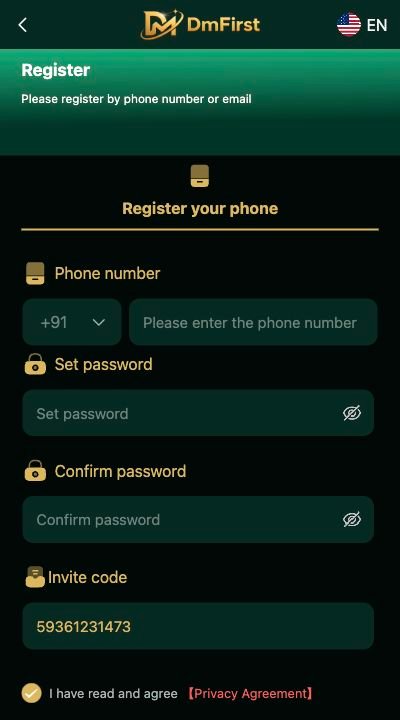
The registration page says Please register by phone number or email and opens on the Register your phone tab. These are the fields you will see:
- Phone number – the country code is preset to +91; type your 10-digit Indian mobile number.
- Set password – create a password you do not use anywhere else. Tap the eye icon to check what you typed.
- Confirm password – type the same password again.
- Invite code – when you open the page from our button this shows 59361231473.
- I have read and agree [Privacy Agreement] – tick the box after reading it, then tap Register.
DM First register problems and fixes
- Number already registered – you already have an account. Use DM First login or Forgot password instead of signing up again.
- Passwords do not match – retype both fields; check for an extra space or capital letter.
- Register button greyed out – a field is empty or the Privacy Agreement box is not ticked.
- Invite code empty – open the page again from our Register button, or type 59361231473 yourself.
After you register on DM First
Once your account is created, use the DM First login page with the same phone number and password. To install the app, see DM First app download.
Frequently asked questions
How do I register on DM First?+
Open the DM First register page, enter your +91 phone number, set and confirm a password, keep invite code 59361231473, tick the Privacy Agreement box and tap Register.
What is the DM First invite code?+
The invite code on our Register link is 59361231473. It records the referral; it is not a password or a bonus guarantee.
Can I register on DM First with email?+
The screen says you can register by phone number or email. The phone tab opens by default.
Is DM First registration free?+
Creating the account does not ask for a payment. Deposits are separate and optional.
What if my number is already registered on DM First?+
Do not create a new account. Go to DM First login and use Forgot password if needed.