
← Explore the connected DM First homepage overview
Where to find the app
We do not host an APK or provide a confirmed app-store listing. If you choose to use the platform, find its current download option within the platform itself. Our Register button opens an account page, not an APK file. Do not mistake a registration redirect for an app download.
Our Android installation checklist
- Confirm the download comes from the operator you intend to use.
- Check the current version, file size and Android requirements on that download page. We have not independently measured a current APK.
- Review the permissions requested and avoid unrelated accessibility, remote-access or device-control requests.
- If Android requires permission to install from this source, understand the risk before changing it. Do not disable device-wide protection to force an install.
- Remove the installer-source permission afterwards if you enabled it and no longer need it.
If the app will not install or open
- Check available storage, device compatibility and whether the download completed.
- Use the current installer from the platform instead of a modified or “hack” APK.
- Save account recovery details before clearing application data or reinstalling.
- Record the exact error message and ask the operator for device-specific help.
iPhone and browser access
We do not have a verified iOS store listing. A website shortcut is different from an App Store application. Confirm what the operator supports before installing a configuration profile or sharing personal details.
What we can verify here
Our game catalogue overview covers the main game categories. For app version and installation requirements, use the current download page. For sign-in problems, start with login help.
DM First APK and browser access compared
| Option | How to access it | What is confirmed |
|---|---|---|
| Browser login | Click Login on our website to open dmfirst1.com. | A public phone/email login page is available. No APK is required to open that page. |
| Android APK | Use a download option provided by the platform, if available. | We have not verified a current APK package, version, size or Android requirement. |
| iPhone app | Use a verified App Store listing if the operator provides one. | We have not confirmed an iOS App Store listing. |
| Website shortcut | Save a browser bookmark or supported website shortcut. | A shortcut opens a website; it is not proof of a native app installation. |
Before clearing app data or reinstalling
Make sure you know the registered phone or email and can receive recovery messages. Clearing app data can remove local sign-in information. Do not create another account just because the app closes or fails to load.
- Record the exact error and when it happens: at launch, login or after opening a feature.
- Check whether the browser login page opens on the same connection.
- If the browser works but the app fails, note the app version and device details for support.
- If both fail, investigate the connection or platform availability before downloading a replacement.
For password and verification issues, use DM First login help. For a device-specific installation error, prepare a support request.
DM First app download bonus banner
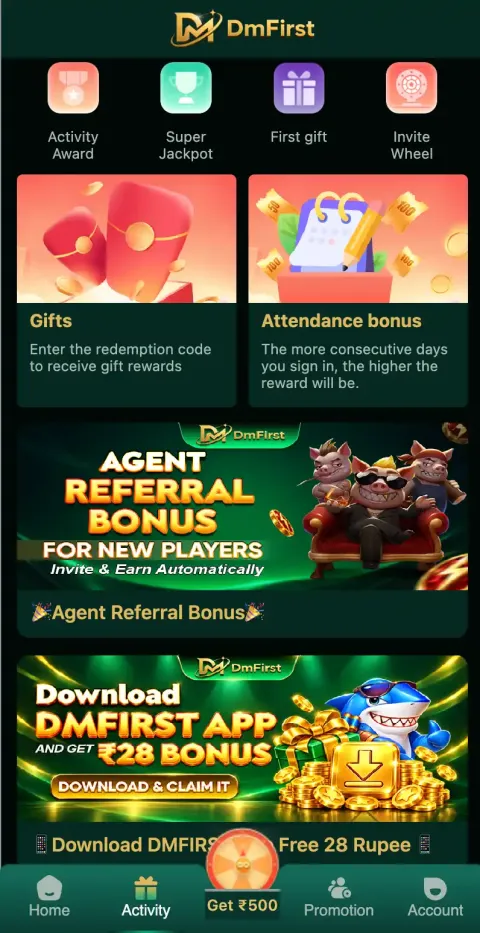
When we checked the Activity page on 27 September 2026 it showed a banner: Download DMFirst App and get ₹28 bonus – Download & claim it. Offers change, so open the banner and read the current terms before relying on it.
The same Activity page lists Activity Award, Super Jackpot, First gift, Invite Wheel, Gifts (redemption code) and Attendance bonus, plus an Agent Referral Bonus banner.
DM First app or browser?
The app and the mobile site use the same account. Install the app if you want a home-screen icon and the download banner offer; use the browser if you do not want to install an APK. Either way, sign in with the same DM First login details.
Frequently asked questions
How do I download the DM First app?+
Open DM First, go to the Activity page and tap the Download DMFirst App banner, or use the download option shown by the platform. Install only from that source.
Is there a DM First app download bonus?+
On 27 September 2026 the Activity page showed a Download DMFirst App and get ₹28 bonus banner. Check the current terms in the app.
Is DMFirst APK the same as DM First app?+
Yes. The DMFirst APK is the Android installation file for the DM First app.
Can I use DM First without the app?+
Yes. You can log in from a mobile browser with the same account.